
Last updated: 22 October 2026
An internal communications plan sets out what you'll communicate to employees, who each message is for, which channel carries it, how often it goes out, and who owns it. Below is a free template you can copy straight into a document, with no sign-up. You'll also find a filled-in example and an eight-step guide to completing it.
Key takeaways
- A plan turns internal communication from "send something when it comes up" into a routine everyone can rely on.
- The core of every plan is one table: what you send, why, to whom, through which channel, how often, who owns it, and how you'll measure it.
- Plan for every employee, including people without a desk or company email. If your channels only reach the office, part of your workforce hears news second-hand.
- Keep messages short. Most employees have ten minutes or less a day to engage with communication (IoIC IC Index 2026).
- Review the plan every quarter, and straight away after any major change.
What is an internal communications plan?
An internal communications plan is a working document that lists the communications you send to employees over a set period, usually a year or a quarter. For each one, it says what the message is for, who receives it, which channel it goes through, how often it's sent, and who's responsible.
It's different from an internal communication strategy. The strategy sets the direction: what you want communication to achieve and why. The plan turns that into action: what goes out, when, and through which channels. If you don't have a strategy yet, our glossary entry on internal communication strategy is a good place to start. You can also build the plan first and let the strategy grow from it.
Why you need one
Without a plan, internal communication tends to happen when someone asks for it. Updates compete with each other, some groups hear nothing, and leaders aren't sure what employees know. Three findings from the IoIC IC Index 2026, a survey of 5,000 UK employees in organisations with 500 or more employees, show the cost:
54%
Fewer employees rate communication highly. Only 54% of UK employees rate their organisation's communication as excellent. That's nine points lower than in 2025, the sharpest single-year decline the research has recorded.
49%
Change is poorly explained. Fewer than half agree that the reasons behind changes are clearly communicated to them, seven points lower than in 2023.
10 min
Attention is short. Most employees have ten minutes or less a day to engage with communication.
Source: IoIC IC Index 2026
A plan helps with all three. It makes sure important messages go out on time, explains the "why" behind decisions, and stops less important updates from crowding out the ones that matter.
The internal communications plan template
Copy the two parts below into a document, a spreadsheet, or a Notion page. Part A is a one-page summary. Part B is your communications calendar, with one row for each communication.
Part A: one-page plan summary
Pastes as a table into Excel, Google Sheets, Word or Notion.
| Section | What to write |
|---|---|
| Plan period | For example: January to December 2027 |
| Plan owner | The person responsible for the plan, and who approves it |
| Where we are now | Two or three sentences on how communication works today, and what isn't working |
| Goals | Two to four goals, each with a number and a deadline |
| Audiences | Every employee group you need to reach, including how they work and which channels they can use |
| Key messages | The three to five messages every employee should understand by the end of the period |
| Channels | Each channel you'll use, what it's for, and who it reaches |
| Roles and approvals | Who writes, who approves, who publishes, and who answers questions |
| Listening | How employees can ask questions and give feedback, and how you'll respond |
| Measurement | What you'll track for each goal, and how often you'll review it |
| Key dates | Fixed events for the period: results, town halls, launches, busy seasons |
Part B: communications calendar
Pastes as a table into Excel, Google Sheets, Word or Notion.
| Communication | Goal | Audience | Channel | Frequency | Owner | How we'll measure it |
|---|---|---|---|---|---|---|
| Example: weekly company news | Keep everyone informed | All employees | Employee app news feed | Every Monday | Internal comms lead | Reach by site |
Add one row for each regular communication, plus a row for urgent messages, so everyone knows how they'll be handled before they're needed.
Prefer a file? Download the template: Excel (.xlsx) · Word (.docx) · PDF (5 pages)
How to fill in the template in eight steps
Step 1: Describe where you are now
Write down how communication works today. Which channels do you use? Who reads them? What do employees and managers say is missing?
Tip: ask five to ten employees from different teams, including at least one frontline team, where they hear company news first. The answers often differ from what head office expects.
Step 2: Set two to four goals
Each goal should say what will change, by how much, and by when. For example: "By the end of June, at least 70% of employees at every site read the weekly company news." Avoid goals you can't measure, such as "improve communication".
Tip: link each goal to a business priority, such as a safety programme, a new system, or retaining new starters. That makes it easier to get support from leaders.
Step 3: Map your audiences
List every group you need to reach, and how each one works. Desk-based staff, shift workers, field teams, managers, and new starters all need different things.
For each group, note:
- where they work and when
- whether they have a company email address and a computer
- which languages they speak
- which channels they can use
Tip: don't skip the frontline. In Germany, almost a third of people in businesses with ten or more staff have no internet access for work, according to Eurostat data for 2025. If your plan relies on email and the intranet, those employees aren't in it.
Step 4: Agree your key messages
Choose three to five messages every employee should understand by the end of the period. For example: where the company is heading this year, what's changing in their work, and how they can give feedback.
Tip: write each message in one plain sentence. If it takes a paragraph to explain, it's too complicated to repeat across channels.
Step 5: Choose your channels
For each audience, pick the channels that reach them. You'll usually need a mix: something for news, something for urgent alerts, face-to-face moments through managers, and a way for employees to respond. Our glossary entry on channel strategy explains how to choose.
Tip: for every channel, ask "Who doesn't this reach?" The section on channels below shows what works for each type of employee.
Step 6: Build your communications calendar
Fill in Part B of the template. Add every regular communication: weekly news, leadership updates, manager briefings, surveys, and events. Then add the fixed dates from your plan summary.
Tip: plan less than you think. With ten minutes or less a day for communication, a few regular, reliable updates work better than many one-off messages. Our post on why sending less won't fix communication overload explains what to do instead.
Step 7: Set roles and approvals
Name who writes, who approves, who publishes, and who answers employee questions for each communication. Agree how fast urgent messages can be approved.
Tip: give managers a clear role. They're often the ones who explain decisions to their teams. But global manager engagement fell from 27% in 2024 to 22% in 2025, according to Gallup's State of the Global Workplace 2026. Short, ready-to-share briefings make their job easier.
Step 8: Decide how you'll measure and review
For each goal, choose what you'll track and how often you'll review it. Then set a date for a quarterly review of the whole plan.
Tip: review the plan straight away after a reorganisation, a leadership change, or a major announcement. A plan that no longer matches the business stops being used.
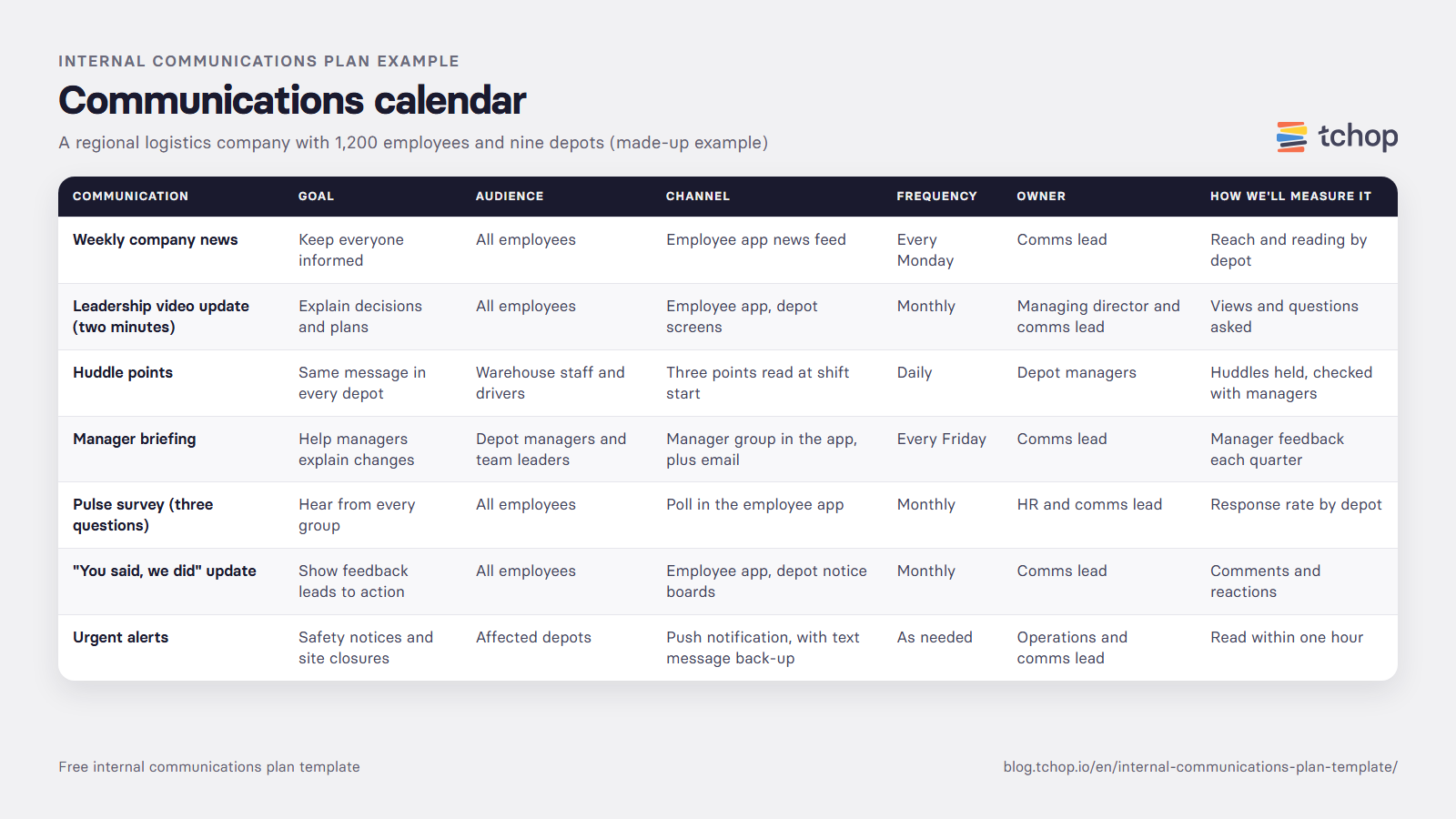
Example: a completed internal communications plan
This example shows what a finished plan can look like. The company and figures are made up for illustration.
The example company
The company: a regional logistics company with 1,200 employees, a head office, and nine depots. About 1,000 employees are drivers and warehouse staff, and most of them have no company email address.
Plan summary
| Section | Example |
|---|---|
| Plan period | January to December 2027 |
| Plan owner | Internal communications lead, approved by the managing director |
| Where we are now | News goes out by email and on depot notice boards. Office staff are well informed, but drivers and warehouse staff often hear news days later from colleagues. |
| Goals | 1. By June, at least 70% of employees at every depot read the weekly company news. 2. By September, half of all employees answer the monthly pulse survey. 3. Every major change is explained to all staff before it starts. |
| Audiences | Office staff (desk, email) · Warehouse staff (shifts, no email) · Drivers (on the road, no email) · Depot managers and team leaders · New starters |
| Key messages | 1. Where the company is heading in 2027. 2. What's changing in depots this year. 3. How to raise ideas and concerns. 4. Safety comes first. |
| Channels | Employee app on personal phones (news and polls for everyone) · Push notifications (urgent news) · Shift-start huddles (team leaders) · Email (office staff) · Depot notice boards (back-up) |
| Roles and approvals | Comms lead writes and publishes. Managing director approves leadership updates. Depot managers run huddles. HR answers pay and contract questions. |
| Listening | Comments on every news post, a monthly three-question poll, and a monthly "you said, we did" update |
| Measurement | Reach and reading by depot, poll response rate by depot, and questions asked each month. Reviewed every quarter |
| Key dates | Annual results (March) · Peak season (November and December) · Summer safety campaign (June) |
Communications calendar
| Communication | Goal | Audience | Channel | Frequency | Owner | How we'll measure it |
|---|---|---|---|---|---|---|
| Weekly company news | Keep everyone informed | All employees | Employee app news feed | Every Monday | Comms lead | Reach and reading by depot |
| Leadership video update (two minutes) | Explain decisions and plans | All employees | Employee app, depot screens | Monthly | Managing director and comms lead | Views and questions asked |
| Huddle points | Same message in every depot | Warehouse staff and drivers | Three points read at shift start | Daily | Depot managers | Huddles held, checked with managers |
| Manager briefing | Help managers explain changes | Depot managers and team leaders | Manager group in the app, plus email | Every Friday | Comms lead | Manager feedback each quarter |
| Pulse survey (three questions) | Hear from every group | All employees | Poll in the employee app | Monthly | HR and comms lead | Response rate by depot |
| "You said, we did" update | Show feedback leads to action | All employees | Employee app, depot notice boards | Monthly | Comms lead | Comments and reactions |
| Urgent alerts | Safety notices and site closures | Affected depots | Push notification, with text message back-up | As needed | Operations and comms lead | Read within one hour |
Prefer a file? Download the template: Excel (.xlsx) · Word (.docx) · PDF (5 pages)
Which channels reach which employees
Many plans go wrong here. They choose channels that work for head office and assume everyone else will catch up. This guide shows which channels reach each group.
| Employee group | Typical situation | Channels that reach them | Channels that often miss them |
|---|---|---|---|
| Desk-based | Computer and company email all day | Email, intranet, chat tools, video calls | Notice boards |
| Shift workers | No desk, often no company email, fixed breaks | Employee app on personal phones, huddles, push notifications, screens in break rooms | Email, intranet |
| Field and mobile | On the road or at customer sites | Employee app, push notifications, short voice or video updates | Email, intranet, notice boards |
| Managers | Responsible for passing news on | Short briefings, a manager group, regular calls | Long documents |
| New starters | No account yet in the first days | Text messages, a welcome pack, a buddy | Intranet, company email |
For urgent news, push notifications are one of the fastest ways to reach people on their phones. Our post on push notifications vs SMS compares the two. For ideas on what to run in each channel, see our list of 40 employee engagement ideas, sorted by where people work.
How to measure whether your plan works
Track four things, and look at them by site, team, and role:
- Reach
- What it tells youDid the people you planned to reach receive the message?
- How to measure itDelivery and open figures by site and role
- Reading
- What it tells youDid they read or watch it?
- How to measure itRead rates, views, and time spent
- Participation
- What it tells youDid they respond?
- How to measure itComments, reactions, poll answers, and questions asked
- Understanding
- What it tells youDo they know what it means for them?
- How to measure itShort pulse questions, such as "Do you understand why this change is happening?"
The most important rule: never rely on one average. An overall read rate of 60% can hide 90% at head office and 20% on the night shift. (These numbers are an illustration, not real data.) Results by group show you exactly where the plan isn't working.
For employee feedback, short regular pulse surveys work well alongside a yearly engagement survey. Our post on pulse surveys vs engagement surveys explains how they fit together. For wider context on engagement and communication, see our employee engagement statistics.
Common mistakes to avoid
Planning only for the office.
If the plan relies on email and the intranet, frontline employees hear news last, if at all.
Too many messages.
More updates don't mean better communication. Every extra message competes for the same few minutes of attention.
No owner.
A plan without a named owner for each communication soon falls apart.
Broadcasting only.
If employees can't ask questions or give feedback, you won't know whether a message landed.
Setting it and forgetting it.
Review the plan every quarter, and after every major change.
FAQ
What should an internal communications plan include?
An internal communications plan should include your goals, your audiences, your key messages, the channels you'll use, a calendar of regular communications, who's responsible for each one, how employees can give feedback, and how you'll measure success. The template above covers all of these in two parts: a one-page summary and a communications calendar.
What is the difference between an internal communication strategy and a plan?
The strategy sets the direction: what internal communication should achieve and why. The plan sets out the actions: which messages go out, to whom, through which channels, how often, and who's responsible. You need both, but a good plan can come first.
How often should you update an internal communications plan?
Review it every quarter, and update it straight away after a reorganisation, a leadership change, or a major announcement. Many organisations write a new plan once a year.
Who should own the internal communications plan?
Usually the internal communications team or lead. In smaller companies, it's often HR or a marketing manager. Whoever owns it needs support from leadership, and managers need a clear role in passing messages on.
How do you include employees without a company email in the plan?
Choose channels that don't depend on email: an employee app on personal phones, push notifications, shift-start huddles, and screens or notice boards on site. Then measure reach and reading for these groups separately, so you can see whether the plan works for them.
Do I need a separate plan for change or crisis communication?
Yes, for major changes and emergencies. A change plan follows the same structure but focuses on one project, with more detail on timing and the questions employees will ask. A crisis plan sets out in advance who approves messages, which channels you use, and how fast you send them.
Make your plan reach every employee
tchop is a communication hub for branded mobile and web apps, made for small teams to reach many employees. People without a desk or company email open their company's branded app with an access code from their employer. News, polls, and push notifications then reach them on their phones. See how our employee engagement platform works, or book a 20-minute demo.