
Somewhere this autumn a renewal quote lands on a desk in internal communications, HR or IT. The line for the frontline licences has gone up by a third, and nobody on the floor has noticed a thing.
That is the state of Microsoft 365 for frontline workers since 1 July 2026, according to Microsoft’s own pricing update. Microsoft 365 F1 rose from $2.25 to $3.00 per user per month, up 33 percent. Microsoft 365 F3 rose from $8.00 to $10.00, up 25 percent. The versions sold without Teams rose by 43 and 29 percent. No other suite in Microsoft’s price update went up by as much.
The question for anyone who signs that quote is simple. What does the licence buy, and what does it leave out?
What changed on 1 July 2026
Microsoft announced the update on 4 December 2025 and applied it to new and renewing customers from 1 July 2026. Existing customers keep their current price until their next renewal, Microsoft’s FAQ confirms, so many companies will meet the new figures for the first time in 2027.
| Plan | Before | From 1 July 2026 | Change |
|---|---|---|---|
| Microsoft 365 F1 | $2.25 | $3.00 | +33% |
| Microsoft 365 F1 without Teams | $1.75 | $2.50 | +43% |
| Microsoft 365 F3 | $8.00 | $10.00 | +25% |
| Microsoft 365 F3 without Teams | $6.93 | $8.93 | +29% |
Prices are Microsoft’s US list prices per user per month, excluding tax. Microsoft notes that pricing “may vary by country and currency”, so the euro figure on your quote will differ, and so will any discount you negotiated.
In return, both frontline plans gain Copilot Chat enhancements (inbox and calendar awareness, plus Word, Excel and PowerPoint agents) and Copilot Chat Analytics, rolling out over the summer. Microsoft’s own explanation for the increase is the value added across the suites: more than 1,100 features released in the past year, by its count.
Microsoft 365 F1 vs F3: what you get
Both plans are built for people who do not sit at a desk. Both include Teams (or can be bought without it), SharePoint, 2 GB of OneDrive storage and the core version of Viva Engage, according to Microsoft’s plan comparison. The differences sit in two places: documents and email. The Exchange Online limits page gives the F3 mailbox size.
| Microsoft 365 F1 | Microsoft 365 F3 | |
|---|---|---|
| Price with Teams | $3.00 per user per month | $10.00 per user per month |
| Office files | Read only, in the browser. No creating, editing or saving | Office apps for the web and for mobile, with editing |
| Mailbox | None. Microsoft states that F1 users are not entitled to use an Exchange mailbox | Exchange Online Kiosk, 2 GB |
| Teams, SharePoint, Viva Engage core, OneDrive 2 GB | Included | Included |
| Added in 2026 | Copilot Chat enhancements, Copilot Chat Analytics | Copilot Chat enhancements, Copilot Chat Analytics |
The Microsoft 365 F1 vs F3 split in one line: F1 is a reading licence. F3 is a reading and writing licence, with a small mailbox. For a shop-floor worker who needs to see the shift plan and the safety update, F1 covers it. For a supervisor who writes the plan, F3 is the one that fits.
What one frontline worker costs now
Take a company with 3,000 employees: 800 at desks on Microsoft 365 E3, and 2,200 in production, logistics and the field.
| Setup for the 2,200 frontline workers | Per year, old prices | Per year, from 1 July 2026 | Difference |
|---|---|---|---|
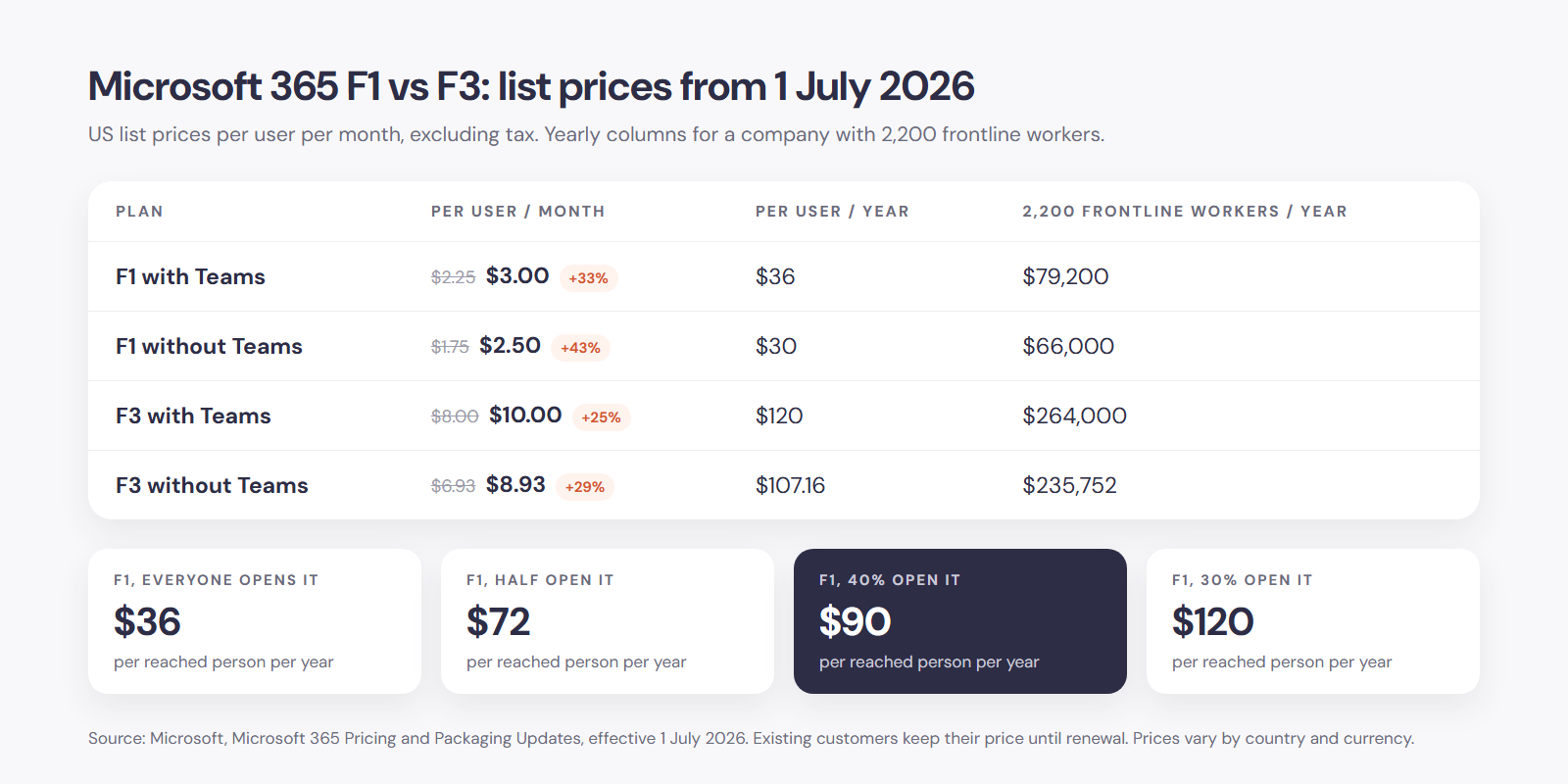
| Everyone on F1 | $59,400 | $79,200 | +$19,800 |
| 200 supervisors on F3, 2,000 on F1 | $73,200 | $96,000 | +$22,800 |
Those are the licence figures. The full cost of reaching a frontline worker has more lines: a device if the company provides one, identity and licence administration, training and the hours someone spends keeping the content fresh. The licence is often the smallest of them. It is also the only one the quote shows.
The licence is the ticket, not the reach
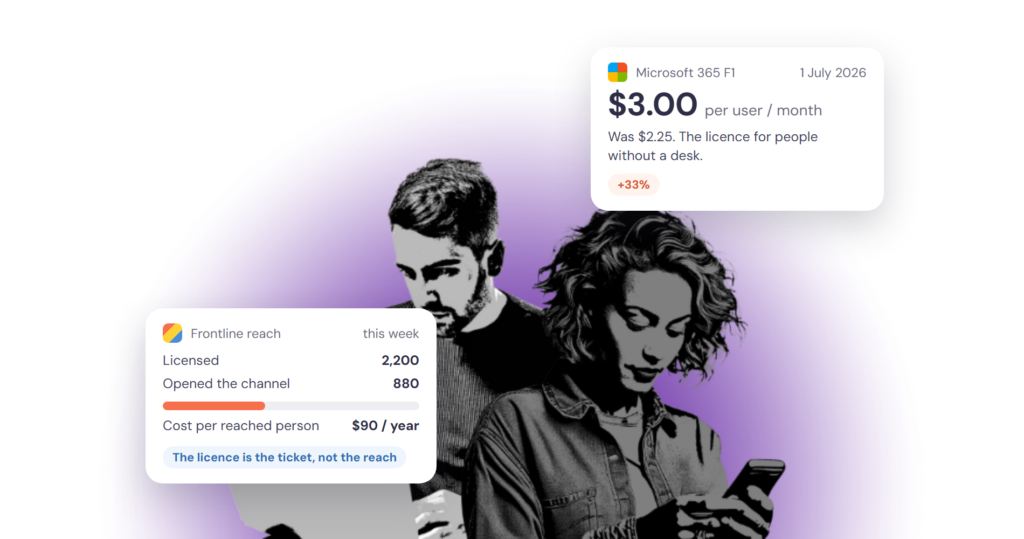
Here is the number the renewal quote leaves out: of the 2,200 people you pay for, how many opened anything last week?
The baseline is lower than most head offices assume. In German companies with ten or more employees, 31.6 percent of the people employed have no internet access for work at all, according to Eurostat’s 2025 survey. In manufacturing it is 36 percent, in food production over 60 percent. The EU average is 35 percent. A licence for someone who never logs in costs $36 a year and reaches nobody.
The cost that matters is the cost per reached person. With 2,200 F1 licences at $79,200 a year, the figure depends entirely on adoption:
| Share of licensed staff active each week | Cost per reached person per year |
|---|---|
| 100 percent | $36 |
| 50 percent | $72 |
| 40 percent | $90 |
| 30 percent | $120 |
The usage reports in the Microsoft 365 admin centre show how many licensed users were active in Teams and SharePoint. Most communication teams have never asked IT for that number. It belongs next to the quote.
Three ways companies set it up
1. F1 for everyone, Teams and SharePoint as the channel. The cheapest route per seat. It works where frontline staff carry a company device or are willing to use Teams on their own phone. News goes out through SharePoint and Viva Connections, both available to frontline licences. Where adoption is high, this is enough.
2. F3 for the people who write. Team leads, shift supervisors and site managers need a mailbox and editable documents. Many companies give them F3 and keep F1 for everyone else. That solves the writing problem. It does not change the reach question for the F1 group.
3. A dedicated employee app for reach, Microsoft 365 for the desks. The app has one job: get news, updates and two-way communication to everyone, including people without a company email address, on the phone they already carry. Microsoft 365 stays where people have desks and accounts. We compared the two routes in why a dedicated employee app offers more than Microsoft Teams and Viva.
None of the three is wrong. The expensive mistake is choosing on price per seat and finding out at the next engagement survey that the channel never reached the floor.
Five checks before the renewal
- How many of the licensed frontline users were active in the last 30 days? Ask IT for the usage report.
- How many frontline staff have a company device, and how many would install a work app on a personal phone? Our rollout guide for temp and frontline workers covers the sign-in options that make the second group possible.
- Who needs to write, send and edit, and who only needs to read and reply? That settles Microsoft 365 F1 vs F3 for each group.
- Which messages must reach everyone within a shift, and what happens today when they do not? We looked at the urgent ones in push notifications or SMS.
- What is the cost per reached person, at today’s adoption and at the adoption you expect in a year?
The fifth question changes the conversation with finance. A channel that costs more per seat and reaches 90 percent of people is cheaper than one that costs less and reaches 40.
Where tchop fits
tchop is a communication hub made for the reach job: a small communications team publishes once, and the news item, push notification, poll or event reaches everyone on the web, in the mobile apps and by email. People without a company email address sign in with the options their employer allows. The hub runs alongside Microsoft 365, with single sign-on for the people who have accounts, and reaches the people who do not. At AOK PLUS, a health insurer with a large field and service workforce, more than 95 percent of employees use the apps every day. We described the reach problem from the shop floor’s side in the night shift never saw the update. Pricing is on request and depends on the size and setup of your organisation.
Next step
If your renewal is coming up and you do not know how many of your frontline licences are being opened, request a demo for employee apps. Bring the usage report and the quote, and we will work out the cost per reached person with you.
FAQ
What is the difference between Microsoft 365 F1 and F3?
F1 is the reading licence: Teams, SharePoint, Viva Engage and 2 GB of OneDrive, with Office files in the browser in read-only form and no mailbox. F3 adds Office apps for the web and mobile with editing, and an Exchange Online Kiosk mailbox of 2 GB. Since 1 July 2026 the US list prices are $3.00 and $10.00 per user per month with Teams.
How much does Microsoft 365 F1 cost in 2026?
$3.00 per user per month with Teams, or $2.50 without Teams, on Microsoft’s US list price since 1 July 2026. That is $36 per user per year. Existing customers keep their old price of $2.25 until their next renewal. Prices vary by country and currency.
What is the mailbox size in Microsoft 365 F3?
2 GB. Microsoft 365 F3 includes Exchange Online Kiosk, which Microsoft’s service description lists with a 2 GB user mailbox and no archive mailbox. Microsoft 365 F1 does not include mailbox rights.
Why did Microsoft 365 F1 and F3 prices go up so much?
Microsoft announced the increase on 4 December 2025 as part of a global price and packaging update, citing the value added across its suites and adding Copilot Chat enhancements and Copilot Chat Analytics to both frontline plans. The frontline suites received the largest percentage increases of any suite in the update: 33 percent for F1 and 25 percent for F3 with Teams, 43 and 29 percent without.
Do I need Microsoft 365 F3 to reach frontline workers with company news?
No. Reaching people with news depends on whether they have a device, an account they will use and a reason to open the channel. The licence tier matters for people who need to write, send email and edit documents. For reach alone, F1 or a dedicated employee app does the job, and the deciding figure is how many people open it.